Compatibility | General Use Info
| Product Information | ||
|---|---|---|
| Component | Model Number (M/N) | S/N Location |
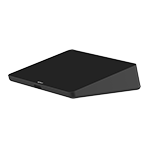
| Tap Touch Controller | No MN | On the rear of the device, under the bottom plate |
| Product Dimensions | ||||||
|---|---|---|---|---|---|---|
| Component | Height | Width | Depth | Cable Length | Weight | Other |
| Tap Touch Controller | 58 mm / 2.3 inch | 244 mm / 9.6 inch | 179 mm / 7.0 inch | 1.25 kg / 2.75 lbs | ||
| HDMI Cable 1.4a cable | 2.0 m / 6.5ft | |||||
| USB 2.0/3.0/3.1 cable | 10m / 32.8ft | Type A (male) to Type C (male) | ||||
| Power Supply with regional plugs | 100-240v 2.95m (9.67ft) 12v 2a 4.00mm/1.70mm plug center positive | |||||
| General Product Specifications | |
|---|---|
| OS/Platform Support (at release) | Windows® 10, Chrome OS™ |
| System Requirements | Windows® 10, Chrome OS™, USB 2.0, 3.0, or 3.1 Type A port |
| Optional Accessory | Table Mount Riser Mount Wall Mount PC Mount Logitech Strong USB cable: 10m, 25m |
| Touch screen - Size | 10.1” diagonal screen with 14° display angle |
| Touch screen - Coating | Oleophobic and anti-glare coating |
| Touch screen - Resolution | 1280 x 800 resolution |
| Ports and Interfaces | USB 2.0/3.0/3.1 Type C (to PC) USB 2.0/3.0/3.1 Type A (for accessory connection) HDMI input (for content sharing) 3.5mm / 1/8 “ 4 pole Headset Jack Integrated ultrasonic speaker Integrated PIR Motion Sensor 100mm x 100mm VESA FDMI (Flat Display Mounting Interface) Kensington Lock Slot on bottom and back of device |
| Touchscreen Specifications | |
|---|---|
|
Size: |
10.1” diagonal screen |
|
Display Angle: |
14° |
|
Display Type: |
IPS (In-Plane Switching) |
|
Panel: |
LCD with LED Backlighting |
|
Resolution: |
1280 x 800 |
|
Viewing Angle: |
85° (up/down/left/right) |
|
Technology: |
Capacitive, 10 point multi-touch |
|
Brightness: |
400 nits |
|
Contrast: |
1000:1 |
|
Anti Fingerprint: |
Anti-fingerprint & anti-glare oleophobic coating |
|
Position Angle: |
0° (flat on mounting surface) |
FREQUENTLY ASKED QUESTIONS
COMPATIBILITY
- Logitech video conferencing devices compatible with Windows 11
- Logitech Tap and Tap IP Availability and Compatibility Information
- Which Logitech devices are certified for Google Hangouts Meet hardware?
- What Chromeboxes are certified to work with Google Meet bundles?
- What hardware is Tap compatible with?
- What software/operating systems is Tap compatible with?
- Compatibility issues with Chrome OS version 75
GENERAL USE INFO
- Zoom Quick Start Guide
- Google Meet Quick Start Guide
- What display options do I have with Tap?
- What's the best configuration for my Tap computer display?
- Tap and Google Meet Licenses
- Where is the web browser on my NUC?
- Cleaning and Disinfecting your Tap Controller
- Can I use a stylus with the Tap?
- What are the dimensions and weight of the Tap touch controller?
- What is a Logitech Room Solution with Logitech Tap?
- How is this different than SmartDock? Is this replacing SmartDock?
- What's not included?
- What’s in the Tap bundle? Are there different options?
- Can I buy a mount or extra cables?
- Is Logitech Tap’s touch controller a tablet?
- How do I purchase spare parts like cables and remote controls?
- Jumpstart Service FAQ for Tap
- Can more than one conferencing platform be installed on Tap?
- Is there a security cable lock connection?
- What interfaces are available on the Tap touch controller?
- When and where is Tap available, and how much does it cost?
Frequently Asked Questions
There are no Downloads for this Product
There are no Downloads for this Version.
Compatible Product
